Project case study · 2026
Applied Vacancies Tracker
A local-first Chrome extension for tracking job applications without spreadsheets, with status workflows, duplicate detection, on-demand page detection, migrations, and privacy-focused data controls.
The problem
During an active job search, I was repeatedly copying company names, vacancy links, dates, statuses, and notes into Google Sheets. The process was slow, easy to forget, and disconnected from the browser where applications actually happen.
I built Applied Vacancies Tracker as a small Chrome extension that keeps this workflow close to the user and stores the data locally without requiring an account.
What the product does
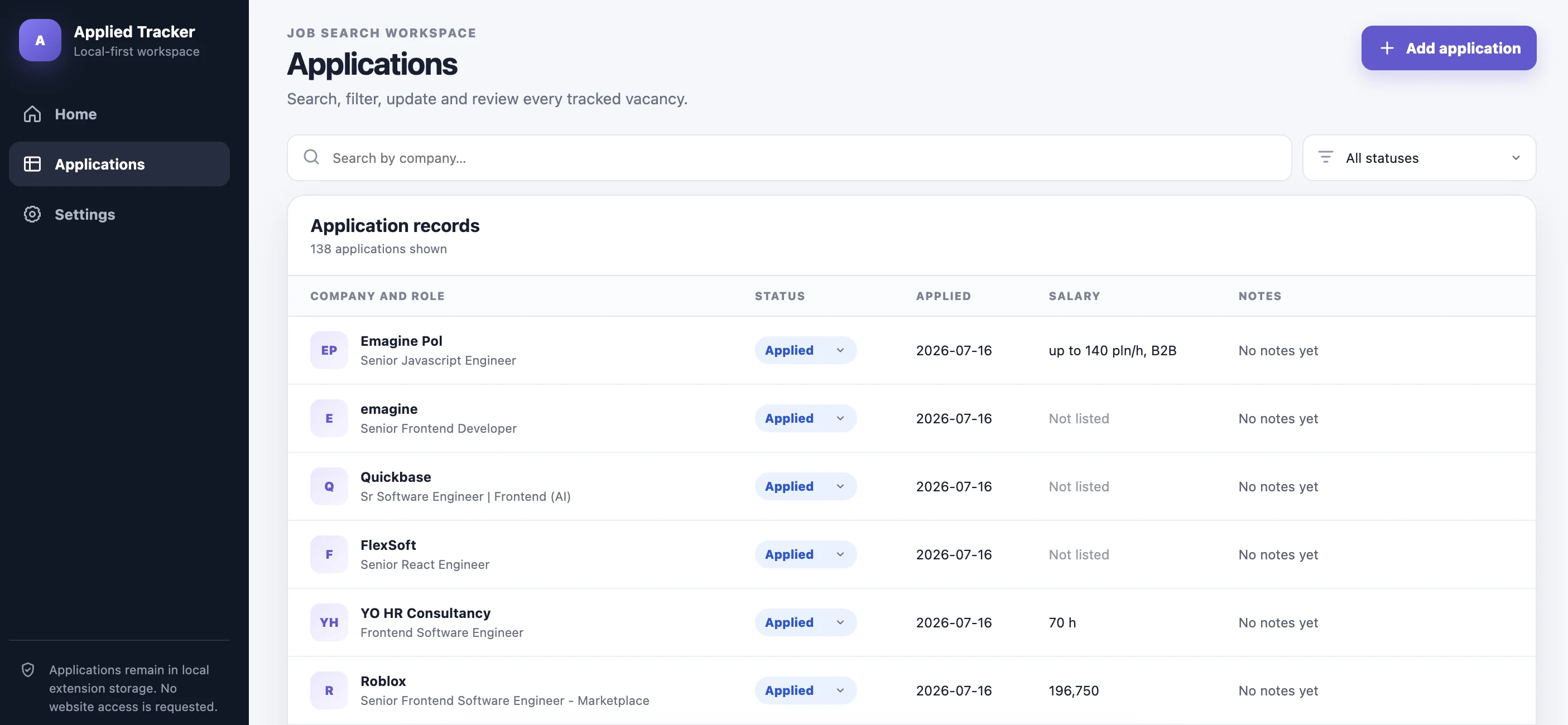
- Creates and edits application records with company, position, date, salary, location, link, notes, and status.
- Detects a vacancy on the page the user has open on demand, previews the extracted fields, and lets the user confirm or edit before anything is saved — never automatic, never in the background.
- Tracks the application lifecycle from initial application through interviews, offer, rejection, or expiration.
- Detects likely duplicate vacancies before creating another record.
- Supports search, filtering, pagination, and application details.
- Automatically expires old inactive applications using a configurable threshold.
- Exports and imports versioned JSON backups.
- Keeps application data inside the user’s Chrome profile.
From MVP to a production-oriented version
The first version proved the workflow, but its UI and internal structure were intentionally small. I later refactored it into a more production-oriented application with:
- a dashboard and clearer information hierarchy;
- a compact application detail panel;
- repository, use-case, domain, infrastructure, and UI boundaries;
- versioned data migrations that preserve records created by older versions;
- runtime validation for imported data;
- explicit privacy and data-management controls;
- a background service worker that restricts storage access to trusted extension contexts;
- on-demand page detection that treats every extracted value as untrusted input: it’s gated behind an explicit “found a job posting” check before it’s allowed to prefill anything, and any URL pulled from the page is scheme-checked before it’s ever rendered as a clickable link.
The extension requests storage plus activeTab and scripting — the latter two only to read the current tab’s content when the user explicitly clicks “Detect”, never in the background and never via broad host_permissions. No application data or page content is transmitted to an external service; extraction and matching are done entirely on-device.
Technical decisions
| Area | Decision |
|---|---|
| UI | React and TypeScript with a dedicated options-page workspace and compact popup |
| Persistence | chrome.storage.local behind repository and adapter interfaces |
| Data evolution | Versioned schema migrations and validated import/export |
| Business rules | Pure functions for expiration and duplicate detection |
| Security boundary | Content scripts cannot directly access the complete application store |
| Page detection | On-demand chrome.scripting.executeScript injection; JSON-LD JobPosting parsing with a keyword-gated heuristic fallback; extracted links are scheme-checked (http/https only) at extraction and again at render time |
| Testing | Unit tests for migrations, matching rules, imports, and UI smoke rendering |
What I learned
Although it is a small extension, it has been a useful exercise in product development rather than only UI implementation. The work includes local persistence, backward compatibility, browser-extension constraints, privacy communication, data migrations, and balancing feature growth with a maintainable architecture.
Next direction
On-demand detection — extracting a vacancy from the open page, previewing it, and adding it only after confirmation — has shipped. The next product phases keep reducing manual work while keeping the user in control:
- highlight relevant skills and constraints in the detected job description;
- later compare a vacancy against one or more user-provided CVs, entirely on-device.
These features are planned, not part of the currently published version.